

How do I fill out and validate IRCC application forms with 2D barcodes?
Some of our forms have a Validate button at the top and bottom. We call these forms “2D barcode forms.”
2D barcode forms help:
- you make sure that you completed all the required fields
- us process your application faster
Follow these instructions to complete, sign and submit a 2D barcode form:
- Download and open the form.
- You’ll need Acrobat Reader 10 (or higher). If you need help, find out how to download and open forms.
- Fill out the form.
- If you’re not sure about the information you must provide, check your application guide.
- Click the “Validate” button, at the top or bottom of the form.
- You must always click the Validate button on 2D barcode forms, whether you submit your application online or by mail.
-
If you provided all the information, a new page with barcodes will appear at end of the document. It will look like this:
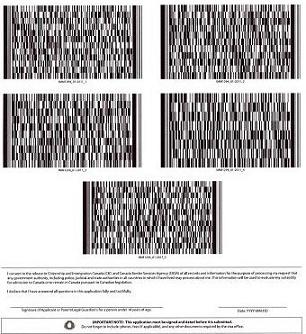
- If you’re missing information, the fields you need to fill out will be outlined in red with a description of what is missing.
- If a barcode does not appear, find out why and how to fix the issue.
-
Get ready to submit the form.

If you apply online:
- Do not print the 2D barcode form.
- Do not use the “signature panel” button at the top of the application.
- Save the form on your computer in a place you’ll remember.
- Upload the form to your account.
- After you upload all the forms for your application, click the “Next” button that appeared below your uploaded documents.
- Enter your name and answer a security question
- This is your electronic signature.

If you apply on paper:
- Print the application form, including the barcodes on the last page.
- The barcodes must be clear. Distortions, smudges or fading can cause processing delays.
- For best results print on white, bond-quality, non-glossy paper using a laser printer.
- Sign and date your application in pen.
- Put the page with the barcodes on the top of your application package before mailing it.
- The mailing instructions are in your application guide.
Page details
- Date modified: