Securing Office 365
May 17, 2024 - Defence Stories
In the era of remote work and communication it is not uncommon for sensitive information to be shared during online meetings, especially on Microsoft Teams. Information security must remain a paramount priority, so it is essential to adopt best practices to protect all confidential information during virtual meetings. The infographic below highlights measures to be followed.
Visit the toolkit (accessible on the Defence network).
Video / May 17, 2024
Transcript
Securing Office 365
How to Handle Sensitive Information
Morning crew!
We’ll be discussing some confidential information; important reminder that no recording of any kind is allowed.
Also, we cannot share Protected B information by files, pictures, recordings, in the text chat or even displayed on the screen. The internet leaves traces!
It looks like your privacy settings are good – no one's lurking, right?
Great, let’s highlight some protected B examples:
Protect B examples:
- Members / Employees personal information
- Security clearances
- Medical Records
- Post Deployment Medical (CF 4025)
- Financial information
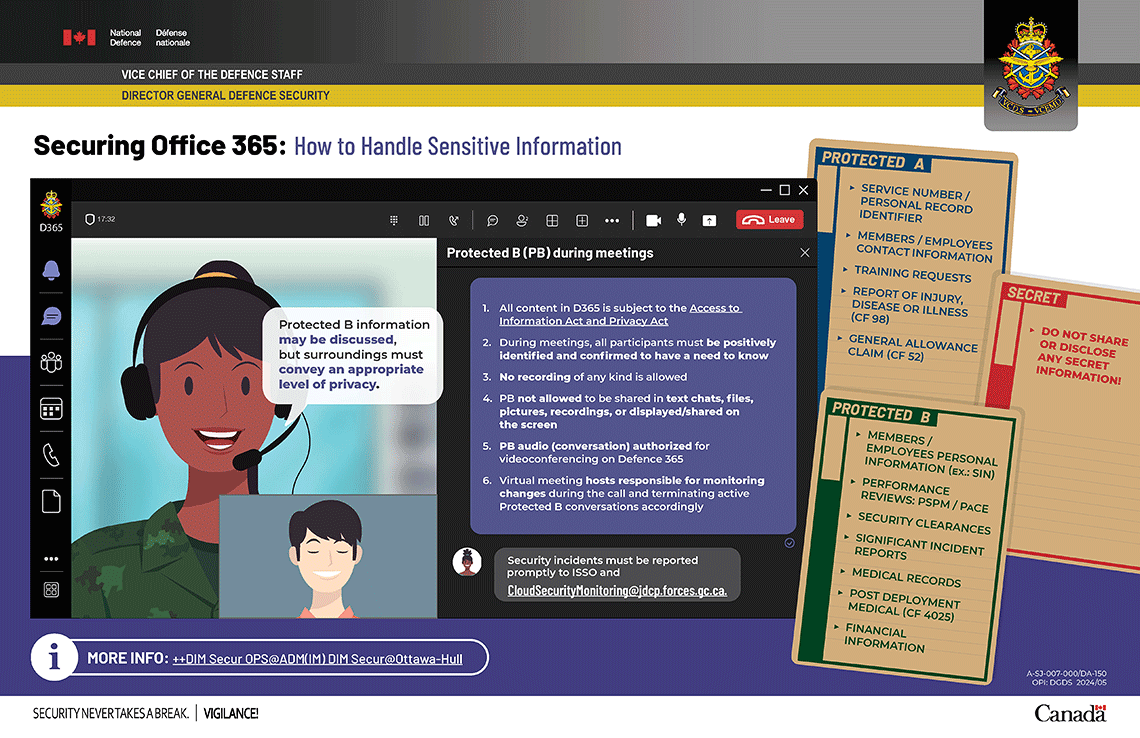
Infographic – Text version
Securing Office 365: How to Handle Sensitive Information
Protected B (PB) during meetings
- All content in D365 is subject to the Access to Information Act and Privacy Act
- During meetings, all participants must be positively identified and confirmed to have a need to know
- No recording of any kind is allowed
- PB not allowed to be shared in text chats, files, pictures, recordings, or displayed/shared on the screen
- PB audio (conversation) authorized for videoconferencing on Defence 365
- Virtual meeting hosts responsible for monitoring changes during the call and terminating active Protected B conversations accordingly
Security incidents must be reported promptly to ISSO and CloudSecurityMonitoring@jdcp.forces.gc.ca
Protect A ex.
- Service number / Personal Record Identifier
- Members / Employees contact information
- Training requests
- Report of Injury, Disease or Illness (CF 98)
- General allowance Claim (Cf 52)
Protect B ex.
Members / Employees personal information: SIN, Name, Address
- Performance reviews: PSPM / Pace
- Security clearances
- Significant Incident Reports
- Medical Records
- Post Deployment Medical (CF 4025)
- Financial information
Secret
Do not share or disclose any secret information!
MORE INFO: ++DIM Secur OPS@ADM(IM) DIM Secur@Ottawa-Hull.